Graph Explorer Open the web app

Explore and edit Graphviz and Mermaid diagrams

Graph Explorer shows DOT and Mermaid text as a diagram that you can work on. Select a node to change its style. Hide the parts that you do not need. Drag from a node to add an arrow. Each edit also changes the source text.

For macOS, Windows, and Linux. Free and open source under the Apache 2.0 license.

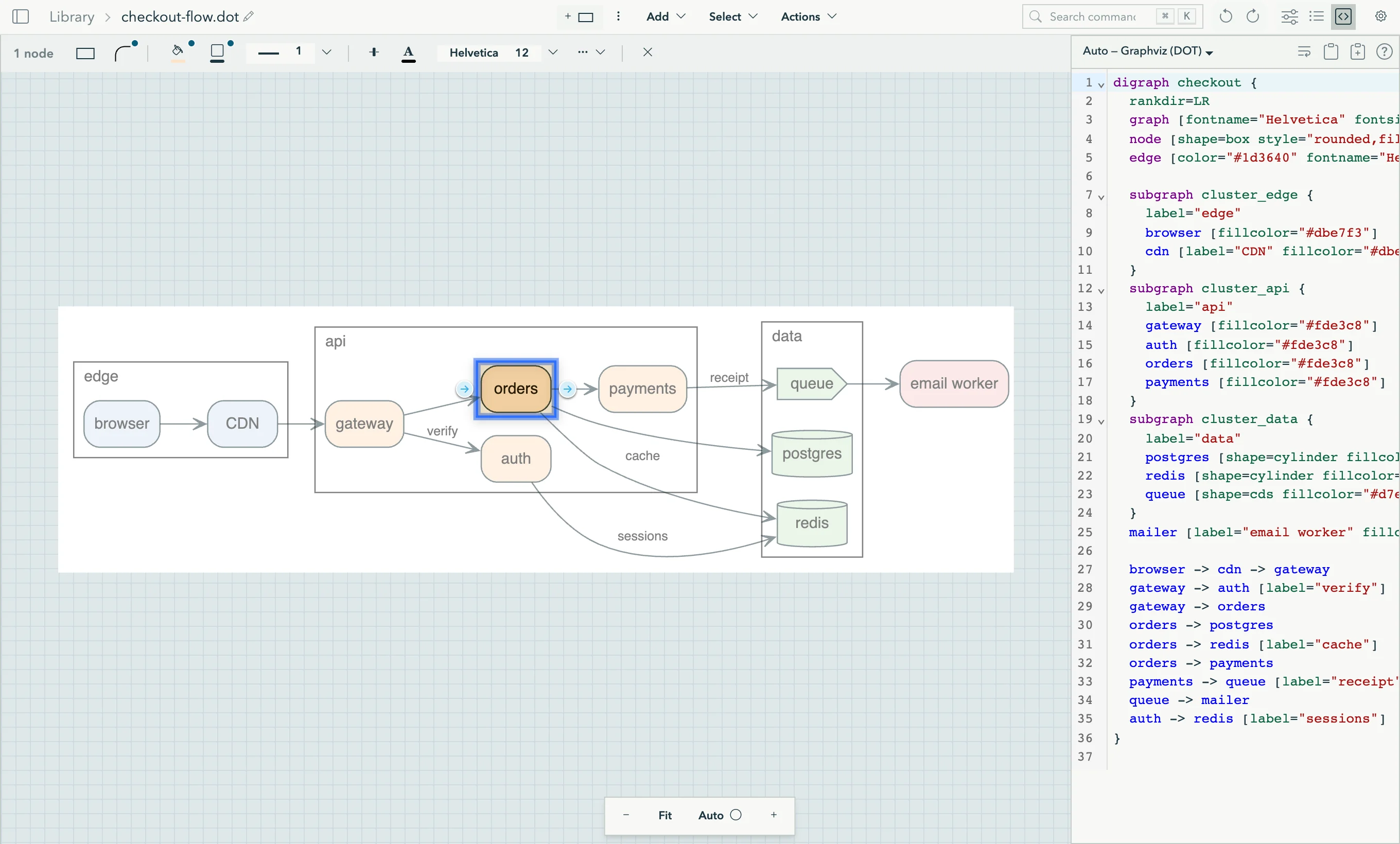
The Graph Explorer window. A DOT diagram of a checkout service is in the center, with the node orders selected. The attribute toolbar is above the diagram, and the DOT source is in a panel on the right.
  1. Attribute toolbar. Set the shape, fill, border, and font of the selection.
  2. Selection. The arrows at the sides show or hide the nodes before and after it.
  3. Groups. DOT clusters and Mermaid subgraphs. Collapse a group into one node.
  4. Source. The DOT or Mermaid text. It changes when you edit the diagram.

One tool for the diagrams in your project

Find your way in a large graph

Select a node, then show or hide the nodes before it or after it, one layer at a time or all of them. Keep only the selection, or hide it. Collapse a group into one node, or zoom into it.

  • / Find a node by its name
  • ⌘K Find a command
  • ←→↑↓ Move the selection along the arrows

Edit the diagram, not only the text

Change the style of the selection from the toolbar. Drag from a node to add an arrow. Drag the end of an arrow to connect it to a different node. Put nodes into a group, and edit DOT records and HTML tables one cell at a time. You can undo each edit.

The same layout as Graphviz

The dot layout engine in Graph Explorer is a port of Graphviz 13.0.1 to Scala. For the same input, it makes the same SVG as Graphviz, byte for byte. The neato, fdp, sfdp, twopi, circo, osage, and patchwork engines come from Viz.js.

Mermaid diagrams too

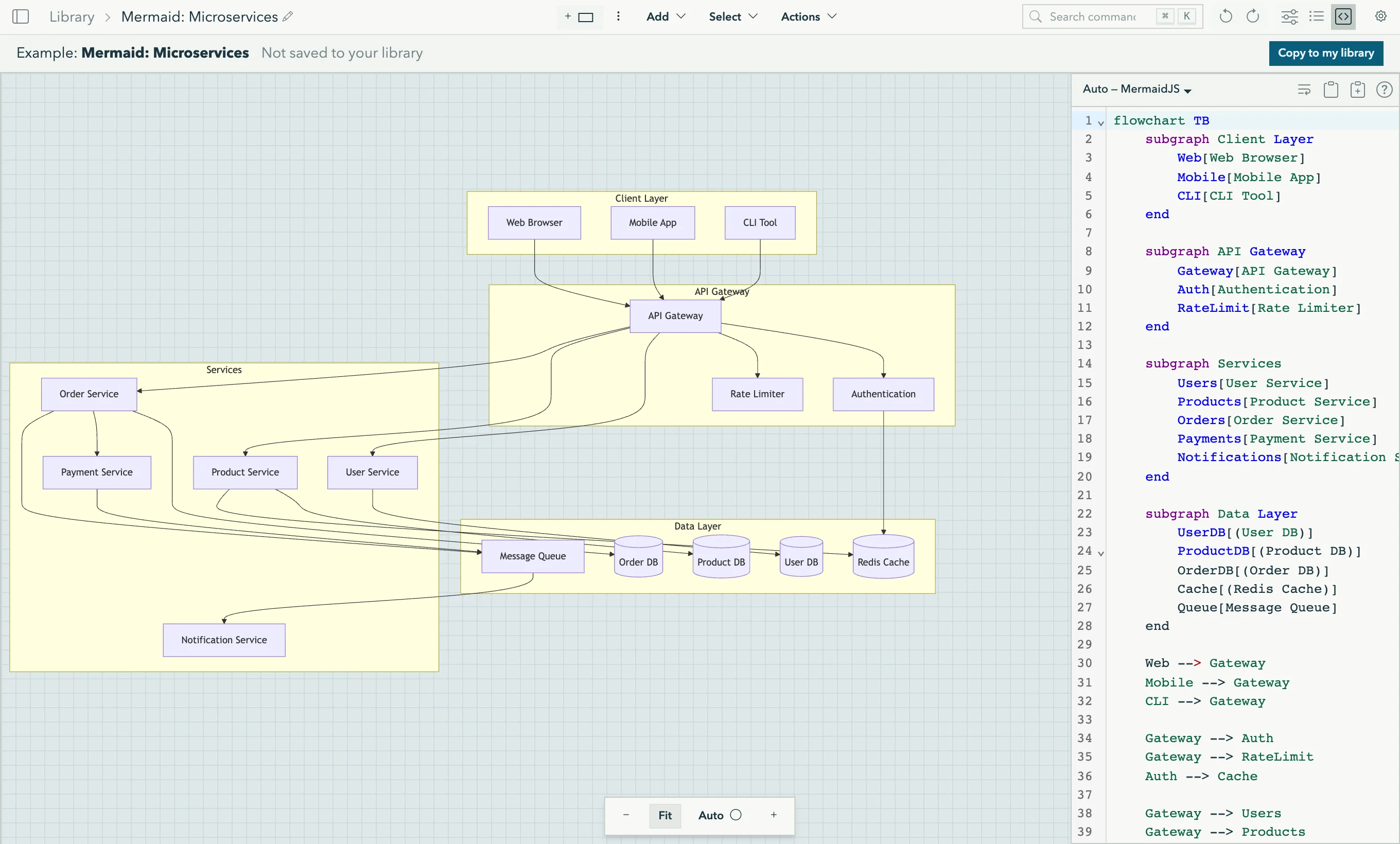
Graph Explorer shows all the diagram types of Mermaid 11: flowcharts, sequence, class, state, ER, Gantt, mind maps, C4, and more. The diagram changes while you type. In a flowchart, you can also select, hide, and edit the nodes.

A Mermaid flowchart of a microservice system in Graph Explorer, with the Mermaid source in a panel on the right.

Copy, share, and change the look

Copy the diagram or the selection as SVG. Copy the graph as DOT or JSON. Copy a link that holds the full diagram. The link opens in the web app. Select one of ten themes, or turn on the 3D view (experimental).

The desktop app follows your files

Open a DOT or Mermaid file from the terminal with gx open. When your editor or a coding agent saves the file, the diagram on the screen changes.

Your editor diagram.dot Coding agent gx Graph Explorer Desktop Library ~/.graph-explorer

Select a box in the diagram to see what it does.

  • Live reload

    The app watches the files that you open. A moment after a save, the diagram shows the change.

  • Save back to the file

    Press ⌘S (CtrlS on Windows and Linux) to write your edits to the file. If the file changed on disk, the app asks which version to keep.

  • A library on disk

    Library diagrams are files in ~/.graph-explorer. The app and gx share them, and a library diagram can stay linked to a file in your project.

Desktop app and web app
Capability Desktop app Web app
Explore and edit DOT and Mermaid diagrams Yes Yes
Where your diagrams are kept Files in ~/.graph-explorer The storage of one browser
Open a file from your disk Yes, with gx open No. Paste the text.
Show changes to the file at once Yes No
Write your edits back to the file Yes No
Control from gx and coding agents Yes No
Share a diagram as a link Yes. The link opens in the web app. Yes
Install Download for macOS, Windows, or Linux Not necessary

gx, the command-line tool

gx reads and edits DOT and Mermaid files by their structure, not by text search. Only gx open and gx session need the desktop app. All other commands work in a terminal with no window.

gx run
List the nodes, arrows, and groups, or change attributes, groups, and records.
gx import
Add a file to the library, linked to that file.
gx sync, gx watch
Keep library diagrams and their files the same, or stream changes.
gx open
Show a file or a library diagram in the desktop app.
gx session
Select elements or reset the view in the window that is open now.

For coding agents

gx comes with a skill file that tells a coding agent how to use it. Run gx skill to get its address for your version, then give it to your agent.

$ gx run arch.dot list-arrows
arrow:api->db/0     source=node:api  target=node:db
arrow:web->api/1    source=node:web  target=node:api

$ gx run arch.dot set-attribute --params \
    '{"targets":["node:db"],"name":"shape","value":"cylinder"}'

$ gx open arch.dot

Download

Release
Latest
Date
See GitHub
Checksums
SHA256SUMS
License
Apache 2.0

macOS Apple silicon

Desktop app (.dmg) gx

Open the .dmg file and drag the app to Applications. Apple has notarized the app and gx.

There is no build for Intel Macs.

Windows x64

Desktop app (.exe) gx.exe

The .exe file is the app. There is no installer.

The files are not signed, so SmartScreen can show a warning. Select More info, then Run anyway.

Linux x86-64

Desktop app gx

The file is the app. Make it executable with chmod +x.

The app needs WebKitGTK 4.1. On Debian and Ubuntu, the package is libwebkit2gtk-4.1-0.

To install gx, put the file in a folder on your PATH and make it executable. On macOS, the first run of gx needs an internet connection, because macOS checks the notarization. The desktop app does not update itself. Download each new release from this page.